


7shifts: Employee Scheduling
4.62.29K Reviews
App Specs
- Version
- 2026.34.0
- Updated On
- License
- Free
- Downloads
- 1,000,000+
- Developer
- 7shifts, Inc.
- Categories
- Business
- Platform
- Android, iOS
Screenshots
 Analysis by AppCompare
Ever tried juggling schedules for a big team? If you’re a manager or business owner, you know it can feel like herding cats. Enter 7shifts: Employee Scheduling, a game-changer in the world of workforce management. Let me take you on a little tour of my experience with this app.
Where restaurant teams can get stuck
Scheduling problems rarely begin with the calendar itself. They tend to show up when availability changes late, a shift needs coverage, or staff members miss an update because the details are scattered across messages and paper notes. A restaurant-focused tool such as 7shifts can help bring those routines together, but it works best when the team agrees to use it as the shared place to check the schedule rather than treating it as one more inbox.
That distinction matters for employees as well as managers. A staff member who only needs to check an upcoming shift may find a dedicated scheduling app clearer than a general group chat, while an owner who already has a reliable system may not gain much by moving everything. I would consider the change most useful when schedule edits happen often enough that people need one consistent source to consult.
Before relying on any scheduling app during a busy service, I’d also decide how the team will handle urgent changes. A posted schedule and a direct conversation are not always the same thing: staff should know whether a notification is merely an update or whether a manager expects them to respond. That simple agreement avoids the assumption that every person has seen a change just because it was entered in the app.
Setup checks that save time later
7shifts is a business app from 7shifts, Inc., built around restaurant team operations. It is free to download, rated for Everyone, and has a 4.6 average from around 8,800 ratings, with more than 1 million installs. It has been available since August 23, 2013, and version 2026.22.0 requires Android 7.0 or later. Those details make it accessible to many Android users, though an older device can still feel slow or behave differently from a newer one.
When setting up a team, I’d check the basics before asking everyone to depend on the schedule: confirm that each person is attached to the right workplace, that names are recognizable to coworkers, and that the intended communication channel is clear. If an employee cannot find a shift, first check that they are looking at the correct schedule and account rather than assuming the shift has disappeared. A small amount of care at the start can prevent repeated questions later.
It also helps to establish who is allowed to make schedule changes and who approves a requested swap. A manager can explain that process in plain language during onboarding, then ask a staff member to locate a shift and find the relevant request option. This is a practical check, not busywork: it reveals confusing labels or access problems before someone needs coverage at short notice.
Worth Reading Before You Choose

EA SPORTS FC Mobile 26 Is a Bigger Football Game, but It Takes Time

Flipboard Shows What News Apps Must Do Beyond the Feed

Switching to Android Auto Means Rethinking Your Driving Routine

Google Calendar Makes a Crowded Week Easier to Manage

Ludo King Makes the Most of the Minutes Between Plans

Baby Panda World Brings Quick Play to Modern Phones, but Its Game Library Feels Busy
For a restaurant with multiple roles or work areas, I would keep the schedule naming and team conventions consistent. If employees have to guess which schedule applies to them, a digital calendar can still create confusion. The useful habit is to treat setup as part of the restaurant’s communication process, not simply as a manager’s one-time technical task.
First Impressions: Sleek and User-Friendly
When I first downloaded 7shifts, I loved how intuitive it felt. You know that feeling when you open an app and it’s just... easy? That’s what happened here. The interface is clean, with a modern look that doesn’t overwhelm you with unnecessary clutter. This app is all about efficiency, and it shows from the get-go.
Whether you’re a tech newbie or a seasoned scheduler, the app welcomes you with open arms. Setting up my profile was a breeze, and I appreciated the little tips that popped up, guiding me through the initial setup like a friendly tour guide.
The Nitty-Gritty: Scheduling Made Simple
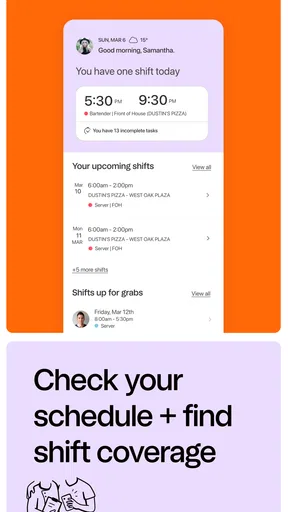
Let’s dive into what makes 7shifts shine—the scheduling feature. This app takes the stress out of creating schedules. With just a few taps, I was able to allocate shifts, adjust hours, and manage availability. The drag-and-drop functionality was particularly handy, making adjustments feel like a walk in the park.
The app also offers a neat way to handle shift swapping. Employees can request swaps, and I could approve or deny them with a simple tap. It’s like having a personal assistant who never gets tired.
Communication: Keeping Everyone in the Loop
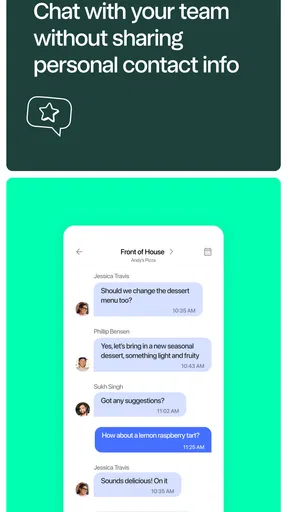
One of the standout features is the built-in messaging system. It’s perfect for keeping everyone on the same page without having to juggle between different apps or platforms. Need to send out a quick note about a schedule change? Done. Want to remind staff about an upcoming meeting? Easy-peasy.
What’s more, the app supports group chats and announcements, making it super simple to address the whole team at once. It’s like having a digital bulletin board that fits in your pocket.
A realistic shift-change routine
Picture a manager checking the coming week before a busy weekend and noticing that one evening is short-staffed. Rather than sending separate texts and hoping everyone sees them, the manager can use the schedule and team communication tools to share the change and ask for coverage. If a coworker proposes a swap, the request can be reviewed in the same general workflow. The important step is to confirm that the replacement is suitable for the role and that the schedule reflects the final decision, instead of treating a message as automatic approval.
For staff, a useful routine is to check the schedule at a regular time, then look again after a change is announced. That may sound basic, but it is more dependable than relying on memory or scrolling through a long chat history. Managers can reinforce the habit by directing questions back to the current schedule, while still communicating directly when a change needs immediate attention.
This is where the app’s combination of scheduling and communication can be more valuable than either feature alone. A shift edit tells people what changed; a short announcement can explain why or what action is needed. The trade-off is that teams must avoid sending the same update through several channels, which can leave employees unsure which version is current.
What the extra tools are useful for
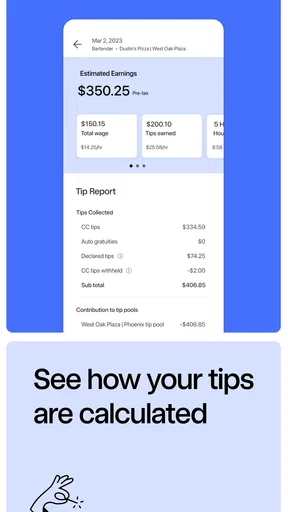
Now, let’s talk about the goodies that come with 7shifts. The app doesn’t just stop at scheduling and messaging. It also offers comprehensive reporting tools. I could easily pull up reports on labor costs, employee hours, and more. These insights are gold for anyone looking to streamline operations and save on costs.
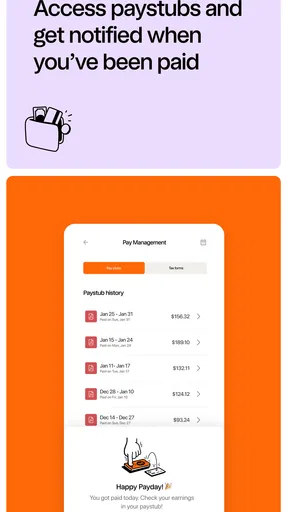
And the best part? It syncs seamlessly with payroll systems, which means less manual work and fewer headaches come payday.
Reports are most helpful when a manager has a specific question, such as whether scheduled hours are lining up with the team’s needs. I would use them as a prompt to investigate, not as a substitute for understanding what happened on the floor. A sudden change in hours might reflect a legitimate coverage issue, and a number on a report does not explain the reason by itself.
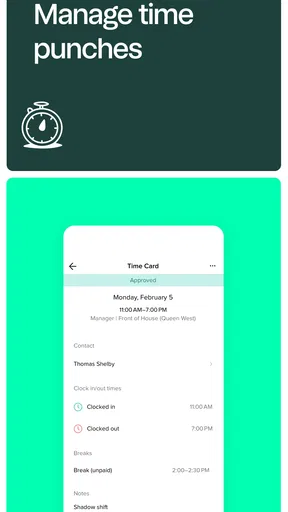
Payroll coordination can also reduce repetitive work, but it should not be treated as a guarantee that every payroll detail is automatically correct. Before a pay run, managers should still review hours and resolve discrepancies through their normal process. When a figure looks wrong, compare the schedule and time records, then check the relevant payroll workflow rather than assuming that a sync has settled the issue.
One useful trade-off to think through is how much of the business you want to manage in one place. Bringing schedules, staff conversations, and operational information together can cut down on switching between tools. On the other hand, a small team that already handles shifts well with a shared calendar and direct communication may see little benefit in adding another system. The value depends on whether coordination is a genuine recurring problem.
Mobile Access: Manage On-the-Go
In today’s fast-paced world, having mobile access is crucial. Luckily, 7shifts has a robust mobile app that ensures you can manage schedules anytime, anywhere. Whether I was at the office or sipping coffee at a café, everything I needed was right at my fingertips.
The app also sends out notifications, so I never miss an important update, keeping everyone in the loop and on time. It’s like having the office in your pocket!
When a problem may be outside the app
If an update seems missing, I would work through the ordinary checks before rebuilding the schedule: confirm the account and workplace, return to the current schedule, and check whether the change was saved or still needs approval. If notifications are not arriving, opening the app directly is a sensible fallback; phone notification settings or a muted conversation can affect what gets noticed even when the underlying information is available.
For a slow or unresponsive screen, close and reopen the app and make sure the device is running a supported Android version. If the same issue continues, note what you were doing when it happened and contact the appropriate support channel rather than repeatedly making changes that could create duplicate requests. These are general troubleshooting steps, not a promise that every problem has the same cause.
Not every scheduling disagreement is a software issue, either. A shift can be visible but still misunderstood, or an employee may expect a swap to be final before a manager has approved it. Clear team rules and a quick direct conversation are often the right fix. I would not rely on any app alone to settle questions about attendance, coverage, or workplace policy.
Compared with a spreadsheet, a shared calendar, or a group chat, 7shifts is aimed more directly at restaurant scheduling and the related team routine. A spreadsheet can be flexible and familiar, but changes may be easy to overlook and manual coordination takes discipline. A general calendar is convenient for simple coverage, yet it may not provide the same restaurant-oriented workflow. A group chat is good for quick conversation, but poor as the only place to find the latest schedule. If a business needs broad workforce planning beyond restaurant teams, a more general workforce platform may fit better.
Who will get the most from it
I’d recommend considering this app if you manage restaurant shifts, deal with frequent changes, and want staff to have a common place to check schedules and communicate. It is also a reasonable fit for employees who need mobile access to their work routine and want to handle schedule-related requests without relying solely on a manager relaying messages.
I would skip it if your team is very small and shifts rarely change, or if everyone already understands and consistently uses a simpler system. It may also be the wrong choice for someone looking for a general personal calendar rather than a workplace tool. Before moving a whole team, it is worth testing whether the actual schedule and communication habits become clearer, instead of assuming that installing an app will solve inconsistent management.
Final Thoughts: A Must-Have for Managers
All in all, 7shifts: Employee Scheduling impressed me with its ease of use, comprehensive features, and ability to make scheduling a less daunting task. It’s an essential tool for anyone managing a team, big or small. If you’re tired of scheduling headaches, this app might just be your new best friend.
If you want to give your scheduling process a serious upgrade, don’t hesitate to check it out on the app store. Trust me, your future self will thank you!
Pros
- Intuitive user interface for easy navigation.
- Seamless integration with payroll systems.
- Automated scheduling saves time and effort.
- Real-time updates improve communication.
- Offers robust reporting and analytics tools.
Cons
- Limited features on the free plan.
- Mobile app can occasionally lag.
- Learning curve for advanced features.
- Notifications can be overwhelming at times.
- Customization options are somewhat limited.
FAQs for 7shifts: Employee Scheduling
What is 7shifts: Employee Scheduling used for?
7shifts: Employee Scheduling is a robust application designed to streamline workforce management for restaurants and other hospitality businesses. It facilitates employee scheduling, communication, and time tracking. Managers can create and edit schedules, while employees can view their shifts, request time off, and swap shifts with coworkers. This app aims to enhance operational efficiency and reduce scheduling conflicts.
Is 7shifts available for both Android and iOS?
Yes, 7shifts: Employee Scheduling is available on both Android and iOS platforms. Users can download the app from the Google Play Store or the Apple App Store. This cross-platform availability ensures that both managers and employees can access scheduling tools and features from their preferred devices, making it convenient for diverse teams.
How does 7shifts help with communication among employees?
7shifts includes a built-in messaging feature that facilitates communication among team members. Employees can chat individually or in groups, helping to coordinate shift swaps or discuss work-related matters. This feature helps reduce miscommunication and ensures that everyone is on the same page regarding schedules and other important updates.
Can 7shifts integrate with other restaurant management tools?
Yes, 7shifts can integrate seamlessly with various other restaurant management tools and POS systems like Square, Toast, and Lightspeed. These integrations allow for streamlined operations, such as syncing labor data and sales analytics, which helps managers make informed staffing decisions and optimize labor costs effectively.
Is there a cost associated with using 7shifts?
7shifts offers different pricing plans to cater to various business sizes and needs. While there is a free basic version for smaller teams, larger organizations might require a subscription to access premium features, such as advanced reporting and integrations. Prospective users can choose a plan that aligns with their operational requirements and budget.


